Latest Articles
Back to blogGeneral
How to Get Notified When Product Prices Change
By Ali•Published on Nov 24, 2026
Contents
- What Are Product Price Change Notifications?
- Why Do Online Product Prices Change?
- Different Ways to Get Notified When Product Prices Change
- How to Set Up Price Alerts for Products
- Instant Price Alerts vs Daily Price Notifications
- Which notification frequency should you choose?
- How to Avoid Missing Genuine Price Drops
- Simplify Price Tracking Across Multiple Online Stores
- Frequently Asked Questions
- final-thoughts
Online shopping makes it easy to compare products and find attractive deals, but there is one problem: product prices can change at any time.
A product that costs $150 today might cost $125 tomorrow, while another item could suddenly become more expensive. Checking every product manually is time-consuming, especially when you are waiting for the right moment to buy.
Fortunately, you can get notified when product prices change by using price tracking tools, setting price alerts, and choosing notification methods such as email or browser notifications. These tools monitor products automatically and inform you when a price meets your selected conditions.
In this guide, you will learn how price notifications work, how to set them up, which notification methods to choose, and how to monitor products across multiple online stores without constantly checking their prices.
What Are Product Price Change Notifications?
Product price change notifications let you know when the price of something you're interested in changes. Instead of checking the same product page every day, you can use a price tracking tool to monitor it and get notified when the price goes up, drops, reaches your target price, or becomes available again (if stock alerts are supported).
For example, imagine you're interested in a pair of wireless headphones that costs $120, but you'd rather pay $90. You can set a target price alert and receive a notification when the price drops to your budget.
Why Do Online Product Prices Change?
Before setting up price alerts, it helps to understand why retailers regularly adjust their prices.
Online prices are not always fixed. They can change depending on several factors.
- Promotional campaigns and seasonal sales: Retailers often offer temporary discounts during holidays, shopping events, and clearance sales. Price notifications help you spot these deals without checking every store manually.
- Competition between retailers: Different stores may sell the same product at different prices. When one retailer offers a discount, competitors may adjust their prices to stay competitive.
- Product demand and availability: Prices can change depending on popularity, demand, and stock availability. However, a price increase doesn't always mean a product is running out of stock, so check availability with the retailer.
- Sellers and product variations: Prices may differ depending on the seller, condition, size, color, or specifications. For example, two smartphones of the same model may have different prices because they offer different storage capacities. Always make sure you're tracking the exact product you want to buy.
You can read this blog post to learn more. best time to buy products online using price history
Different Ways to Get Notified When Product Prices Change
There are several ways to receive price change notifications. The best option depends on how frequently you shop online and how quickly you want to know when a product's price changes.
1. Email price alerts
Email notifications are one of the most convenient ways to follow product prices.
Email alerts are useful because you can review price changes later without needing to keep a shopping website open.
Best for: Shoppers who want a simple way to receive and review price updates.
2. Browser notifications
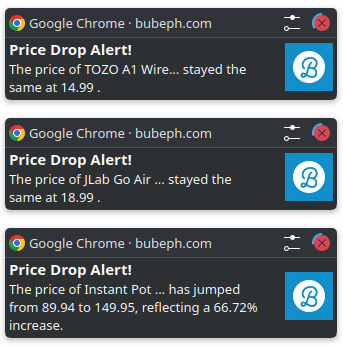
Browser notifications allow websites to send price change alerts directly to your desktop or browser, even when you're visiting another website.
After granting notification permission, you'll be notified when a tracked product reaches your target price.
The image below shows an example of a browser price alert.
Best for: Shoppers who want to receive instant price updates without checking their email.
3. In-app notifications
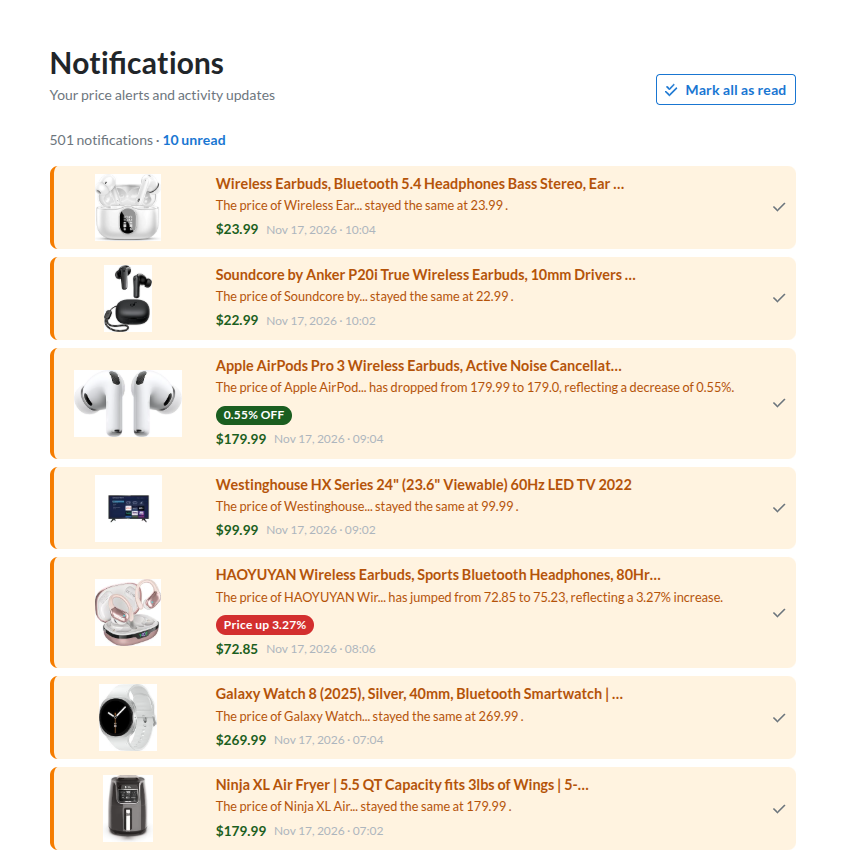
Some price tracking platforms provide notification centers inside their applications or websites.
These notifications allow you to review important events in one place, including:
- Recent price drops.
- Price increases.
- Products reaching target prices.
Updates concerning tracked products.
This is particularly useful when you are monitoring several products simultaneously.
If you're logged in, you can visit the notifications page
Best for: Shoppers who want to manage their tracked products and notifications from one dashboard.
How to Set Up Price Alerts for Products
Setting up automatic price notifications is relatively straightforward when you use a dedicated price tracking tool.
Here is a practical process you can follow.
Step 1: Find the product you want to monitor
But first, you need to find the product you want to track. Bubeph offers two ways to do this:
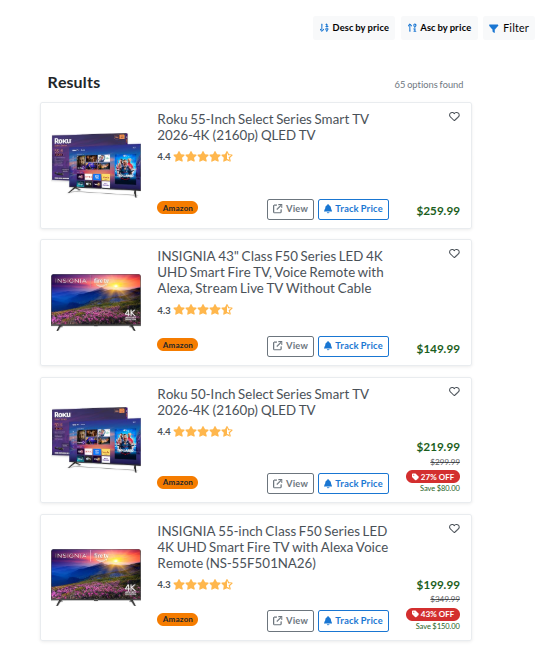
Option 1: Search for a product
Go to the search page and enter the name of the product you want to find. Bubeph will search for matching products across supported online stores. The number and quality of available search results may vary depending on your subscription plan.
Option 2: Analyze a product URL
Alternatively, you can visit the a Product Analyzer page and paste the URL of the product you want to track.
You can check the list of supported online stores here: supported sites.
For more details on how to use the Product Analyzer, check out this guide: how to use the Product Analyzer
Can't find your favorite store? No worries! You can contact our team at contact@bubeph.com and request support for a new store. That's actually what I did, and they added my store! Hahaha. However, it hasn't appeared in the supported stores list yet.
Step 2: Add the product to a price tracking tool
To add a product to your tracking list, simply click the “Track Price” button, as shown in the image.
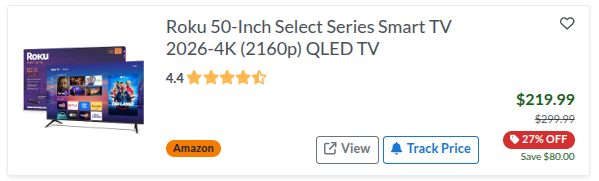
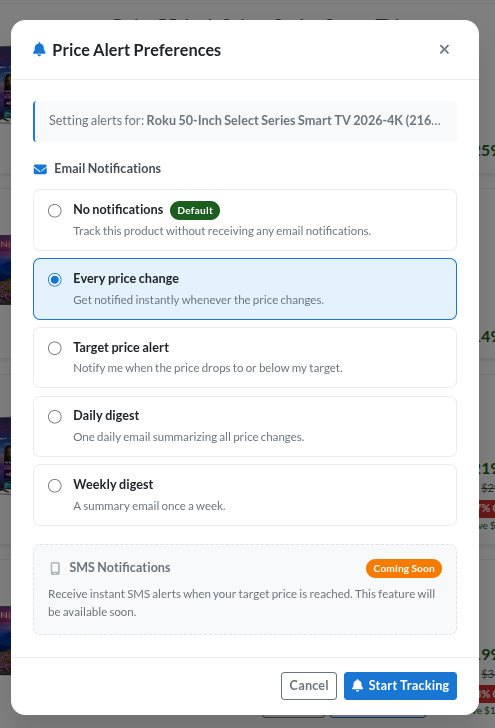
A pop-up window will appear, showing how many credits are required to track the product.
The final step is to choose how you want to receive notifications. Personally, for some products, I prefer the “Every price change” option so I don't miss any updates. But the choice is yours and depends on your preferences and how often you'd like to be notified.
Step 3: Set your target price
A target price is the amount you are willing to pay for a product.
For example, imagine you want to purchase a laptop:
- Current price: $850.
- Your preferred budget: $750.
- Target price: $750.
You can configure a target price alert so that you receive a notification when the tracked price reaches your preferred amount.
Taking this example, click on the “target price alert” and then start tracking.
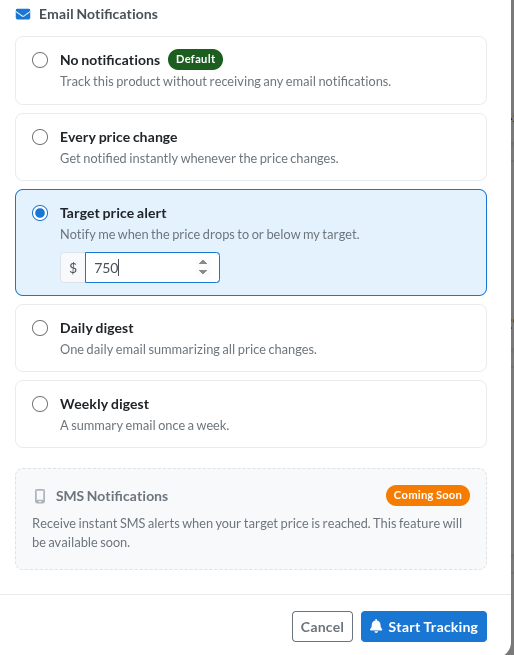
It's important to set a realistic target price. If you set it much lower than the product's usual price, you might have to wait a long time before receiving an alert.
Step 5: Let the tool monitor the product
After you configure your alert, the tracking service monitors the product based on its checking frequency.
When a price change matches your notification conditions, you receive an alert.
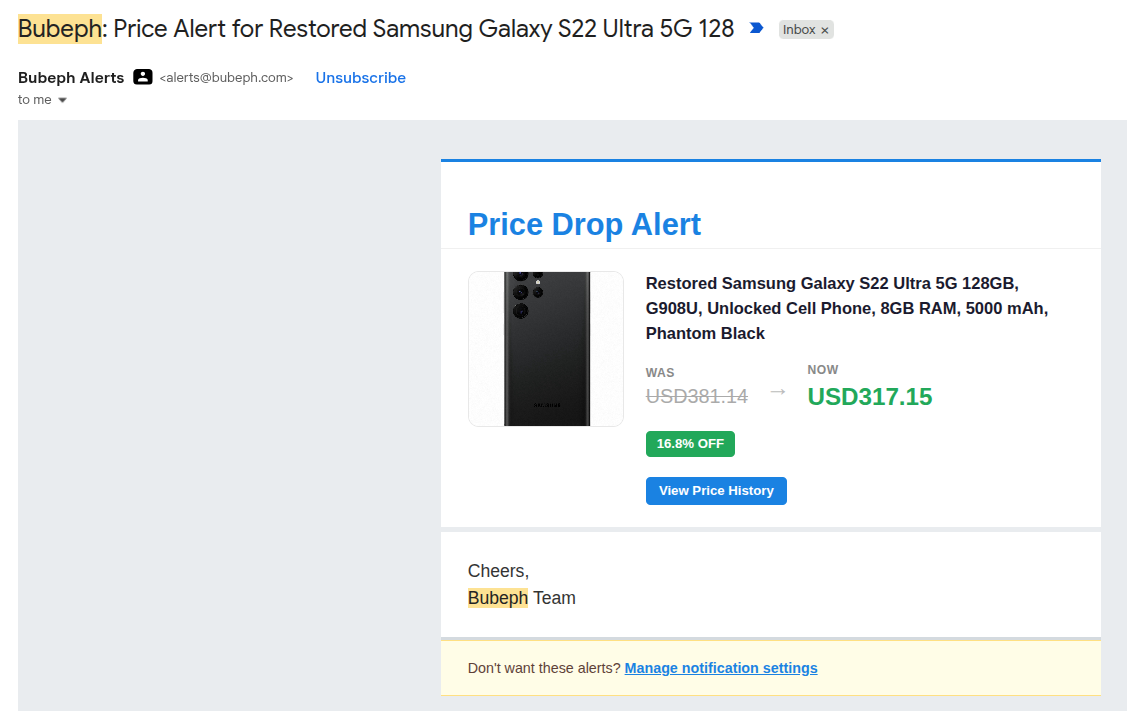
You can then visit the retailer's website to verify the current offer and decide whether to purchase the product. Or check the price history to see if the current price is a good deal compared to historical trends.
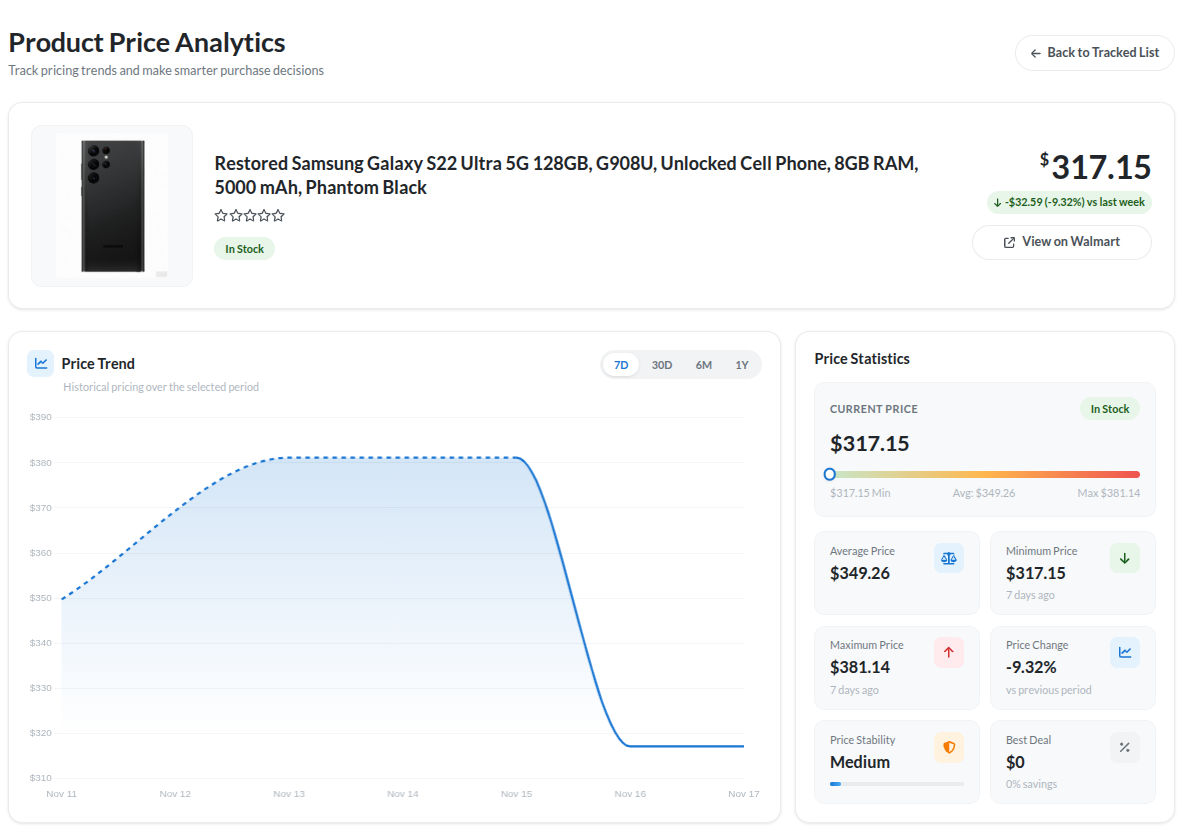
The price history page gives you useful insights into how a product's price has changed over time. You can also visit the retailer's website directly from this page.
Remember that an alert does not guarantee that the price will remain available. Always check the retailer's current listing before completing your purchase.
Instant Price Alerts vs. Daily Price Notifications: Which Is Better?
Not every shopper needs to receive a notification every time a product's price changes.
The right notification frequency depends on your shopping habits and how closely you want to monitor a product.
Personally, I prefer instant price alerts, but it really depends on the product. Some products have frequent price changes, while others don't, so daily or weekly notifications may be a better option. Some of my friends who use the tool regularly also prefer setting a target price and only receiving an alert when the product reaches it.
Which notification frequency should you choose?
| Situation | Recommended approach |
|---|---|
| Expensive products | More frequent alerts |
| Products with a strict target budget | Target price alerts |
| Several tracked products | Daily summaries |
| Products you are not buying immediately | Less frequent updates |
| Frequently changing prices | More frequent monitoring |
The most important thing is to receive useful notifications rather than simply receiving more notifications.
How to Avoid Missing Genuine Price Drops
A price notification doesn't always mean you've found the best deal. Before buying, take a moment to check a few things:
1. Check the product's price history
As mentioned above, don't rely on the advertised discount alone. Compare the current price with its average price and historical lows to see if it's a genuine deal.
2. Verify the seller and product condition
Check whether the product is new, used, or refurbished, and whether it's sold by the retailer or a third-party seller. Also review the warranty and return policy.
3. Confirm the latest price
Some price tracking tools check product pages periodically, so they might not detect every price change immediately. Always visit the retailer's website to confirm the current price before purchasing.
Simplify Price Tracking Across Multiple Online Stores
Comparing prices before buying has become an important part of online shopping. According to this Ipsos survey conducted in January 2025 among 3,000 respondents globally, 68% said they always or often compare prices of identical or similar products across online retailers before making a purchase. This shows how useful it can be to have an easier way to keep track of prices.
That’s where Bubeph comes in. Instead of repeatedly visiting different stores, you can use it to track products across supported platforms, check their price history, receive notifications when prices change, and set target prices based on your budget. You can also manage multiple tracked products in one place, making it easier to follow prices and decide when to buy.
Frequently Asked Questions
How can I get notified when a product goes on sale?
You can use a price tracking tool to monitor a product and receive notifications when its price decreases or reaches a target amount. Depending on the service, alerts may arrive through email, browser notifications, or an application.
Can I receive an email when a product price changes?
Yes. Many price tracking services support email notifications. After adding a product to your tracking list, enable email alerts and configure the conditions that should trigger a notification.
Can I track prices across multiple online stores?
Yes. Some price tracking platforms support multiple retailers, allowing you to monitor the same product across different online stores. However, retailer coverage depends on the service and supported marketplaces.
Can I get notified when a product's price increases?
Yes, if your chosen price tracking service supports price increase alerts. These notifications can help you monitor price fluctuations in both directions, rather than only receiving alerts about discounts.
Are price alerts free?
Some services offer free price alerts, while others limit the number of tracked products, checking frequency, or available notification options. Check the pricing and feature limitations of the service before creating your tracking list.
How often do price tracking tools check product prices?
The checking frequency depends on the platform and its subscription plan. Some services check prices once a day, while others offer more frequent monitoring. The checking interval determines how quickly a detected price change can trigger a notification.
Is a price drop notification always a good deal?
Not necessarily. A price drop should be evaluated against the product's historical prices, shipping costs, seller reputation, product condition, and final checkout price.
What is the difference between a price alert and a price tracker?
A price tracker monitors and records changes in a product's price over time. A price alert is a notification generated when the tracked price meets a particular condition, such as dropping below a target amount.
Final Thoughts
Price tracking tools make online shopping easier by monitoring products, setting target prices, and notifying you when prices change. Instead of checking product pages every day, you can stay informed through email alerts, browser notifications, or daily summaries.
Combine automatic price tracking with price history analysis to spot genuine deals and make better purchasing decisions.
Ready to save time and shop smarter? Start tracking your favorite products with Bubeph.